This SOP provides step-by-step instructions for designing CRISPR guide RNAs (gRNAs) using the CHOPCHOP web tool. The goal is to automate gRNA selection for knockout experiments while reinforcing understanding of how CRISPR-Cas9 functions at the molecular level.
Watch the short video above to understand Cas9’s role as a DNA-cutting enzyme guided by RNA sequence complementarity. The animation highlights:
CRISPR-Cas9 gene editing relies on a 20-nucleotide gRNA adjacent to a PAM site recognized by Cas9. When targeted to early coding exons, the repair of the Cas9-induced DNA break by non-homologous end joining (NHEJ) introduces indels that inactivate the gene. CHOPCHOP automates discovery, scoring, and ranking of these gRNA targets, minimizing manual design steps.
Open https://chopchop.cbu.uib.no/. The homepage displays four main input boxes labeled Target, In, Using, and For.
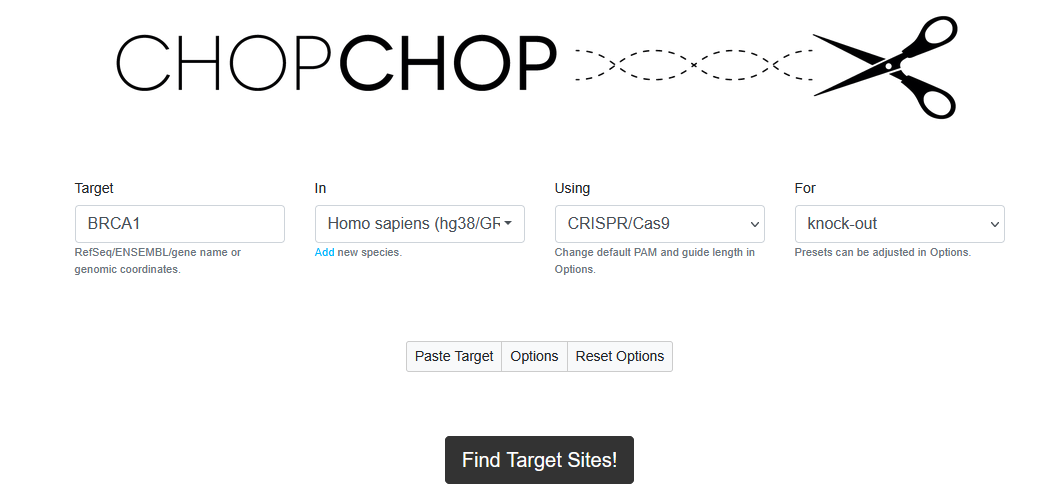
| Field | Description | Example |
|---|---|---|
| Target | Type the gene name, RefSeq/ENSEMBL ID, or genomic coordinates. | BRCA1 |
| In | Select organism and genome assembly. | Homo sapiens (hg38) |
| Using | Choose the CRISPR enzyme and PAM system. | CRISPR/Cas9 |
| For | Select the application type. | knock-out |
Click Find Target Sites! to begin the automated design.
CHOPCHOP displays:
Review the ranked guide list and choose only one gRNA for your knockout experiment. This selection should meet all of the following criteria:
Click on your chosen gRNA in the results table to open its Detailed Guide View.
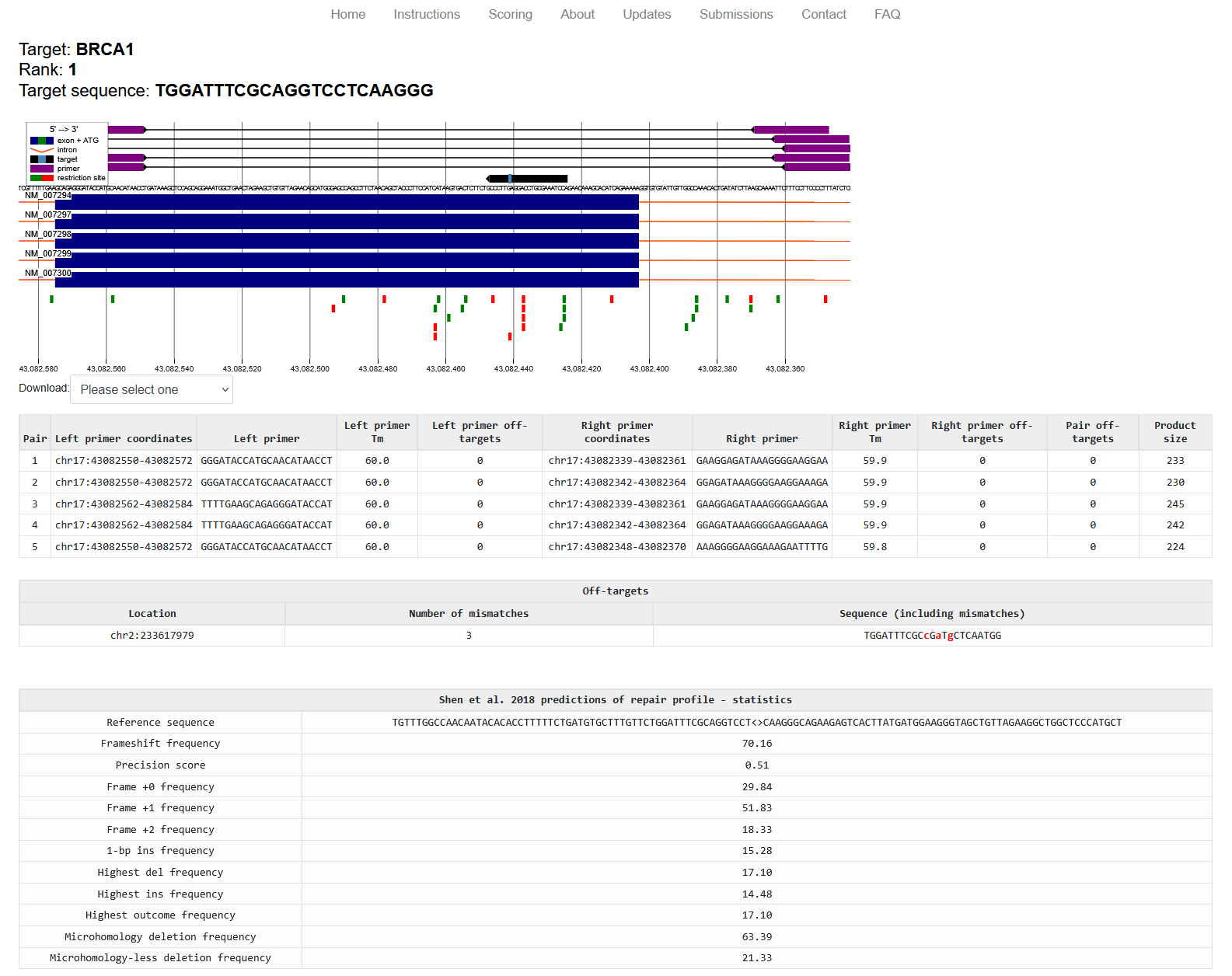
The detailed view shows:
Primer Selection Tip: For your knockout validation PCR, select the primer pair that meets these criteria:
While viewing your selected gRNA’s detailed page, scroll to the “Download:” menu above the primer table. Download both of the following files:
BRCA1_gRNA1_CHOPCHOP.gbBRCA1_gRNA1_CHOPCHOP.tsvThese files contain:
.gb).tsv)Save both files and upload them later with your Google Form submission. Example filenames:
BRCA1_gRNA1_CHOPCHOP.gbBRCA1_gRNA1_CHOPCHOP.tsv
BRCA1_gRNA1_CHOPCHOP.gb and click Import.BRCA1_gRNA1_Final_Target and confirm annotations.BRCA1_gRNA1_Benchling_Map.pdf.After completing your CHOPCHOP and Benchling work, submit all required files via the Google Form:
Submit Your Work| Requirement | Description |
|---|---|
| Video | Watched "How CRISPR-Cas9 Works" |
| Gene entry | RefSeq/ENSEMBL ID and species entered correctly |
| gRNA sequence | Final 20-nt guide (without PAM) |
| 📎 .gb file | CHOPCHOP GenBank annotated file |
| 📎 .tsv file | CHOPCHOP results table |
| 📎 .pdf file | Benchling annotated sequence map |
Submit all three files (.gb, .tsv, .pdf) through the Google Form above. Ensure filenames match the recommended format and appear in your Drive submission folder.